
Appearance
How to Collect Customer Feedback in monday.com (Without Messy Boards)
Many teams use monday.com as their central workspace — for projects, operations, and internal collaboration.
But when it comes to customer feedback, things usually fall apart.
Feedback ends up scattered across:
- support tickets
- emails
- Slack messages
- random notes
As a result:
- valuable insights get lost
- product decisions rely on incomplete data
- prioritization becomes guesswork
The good news: you can build a simple, scalable feedback system directly in monday.
In this guide, we'll walk through:
- a basic setup
- where it breaks
- and how to create a system that actually works
Why collecting feedback in monday is harder than it should be
While monday is flexible, it's not designed specifically for feedback management.
Here are the common challenges teams run into:
No built-in feedback portal
There's no easy way for customers or internal teams to submit ideas in a structured way.
No voting or prioritization system
You can track feedback — but not easily answer:
“Which requests matter most?”
External feedback is hard to manage
Pulling in feedback from outside your organization often requires workarounds.
Boards get messy quickly
As feedback grows, boards become:
- cluttered
- duplicated
- hard to navigate
If this sounds familiar — you're not alone.
The simplest way to collect feedback in monday (basic setup)
Before improving the system, let's start with the most common baseline setup.
Step 1: Create a feedback board
Set up a dedicated board with columns like:
- Idea / Request (text)
- Reported By (customer, sales, support)
- Status (new, reviewing, planned)
- Priority (low → high)
This gives you a central place to store feedback.
Step 2: Use forms to collect input
Add monday's form view. It allows you to:
- collect feedback from internal teams
- share forms externally
Each submission automatically creates an item in your board.
Step 3: Centralize everything
The key is consistency:
- all feedback goes into one board
- no side channels
At this stage, you already have something usable.
But it won't scale well.
Where this setup breaks down
Once feedback volume increases, problems appear quickly.
Duplicate ideas
Multiple people submit the same request — and there's no easy way to merge them.
No voting → weak prioritization
You can't easily see:
- which requests are most popular
- how many customers care
No visibility for customers
Users don't know:
- if their request was seen
- if it's planned
Manual triaging becomes overwhelming
Someone has to:
- review every submission
- categorize it
- assign priority
The board often turns into chaos.
A better way: structured feedback system (with voting + visibility)
Instead of treating feedback as a simple list, high-performing teams build a system.
A good feedback system includes:
Central intake
All feedback flows into one structured entry point.
Organization layer
Requests are:
- categorized
- tagged
- deduplicated
Prioritization mechanism
You can clearly see:
- demand (votes or frequency)
- impact
Visibility
Stakeholders (and sometimes customers) can see:
- what's being considered
- what's planned
This transforms feedback from:
a messy backlog → a decision-making tool
How to set up a scalable feedback system in monday (step-by-step)
Step 1: Create a single intake flow
Avoid multiple entry points.
Options:
- one shared form
- one intake channel internally
Goal:
every piece of feedback enters the same system
Step 2: Structure your feedback
Add fields like:
- category (feature, bug, improvement)
- customer segment
- use case
Step 3: Introduce prioritization
Instead of guessing priority, use signals like:
- number of requests
- frequency of mention
- business impact
Step 4: Maintain visibility
At minimum, your team should see:
- what's under review
- what's planned
- what's done
Optionally, you can share updates externally.
Optional: simplify the process with a dedicated solution
At some point, maintaining a feedback system manually inside monday becomes time-consuming.
Turn your monday board into a public feedback portal
Customer Voice turns your existing monday board into a customer-facing feedback system.
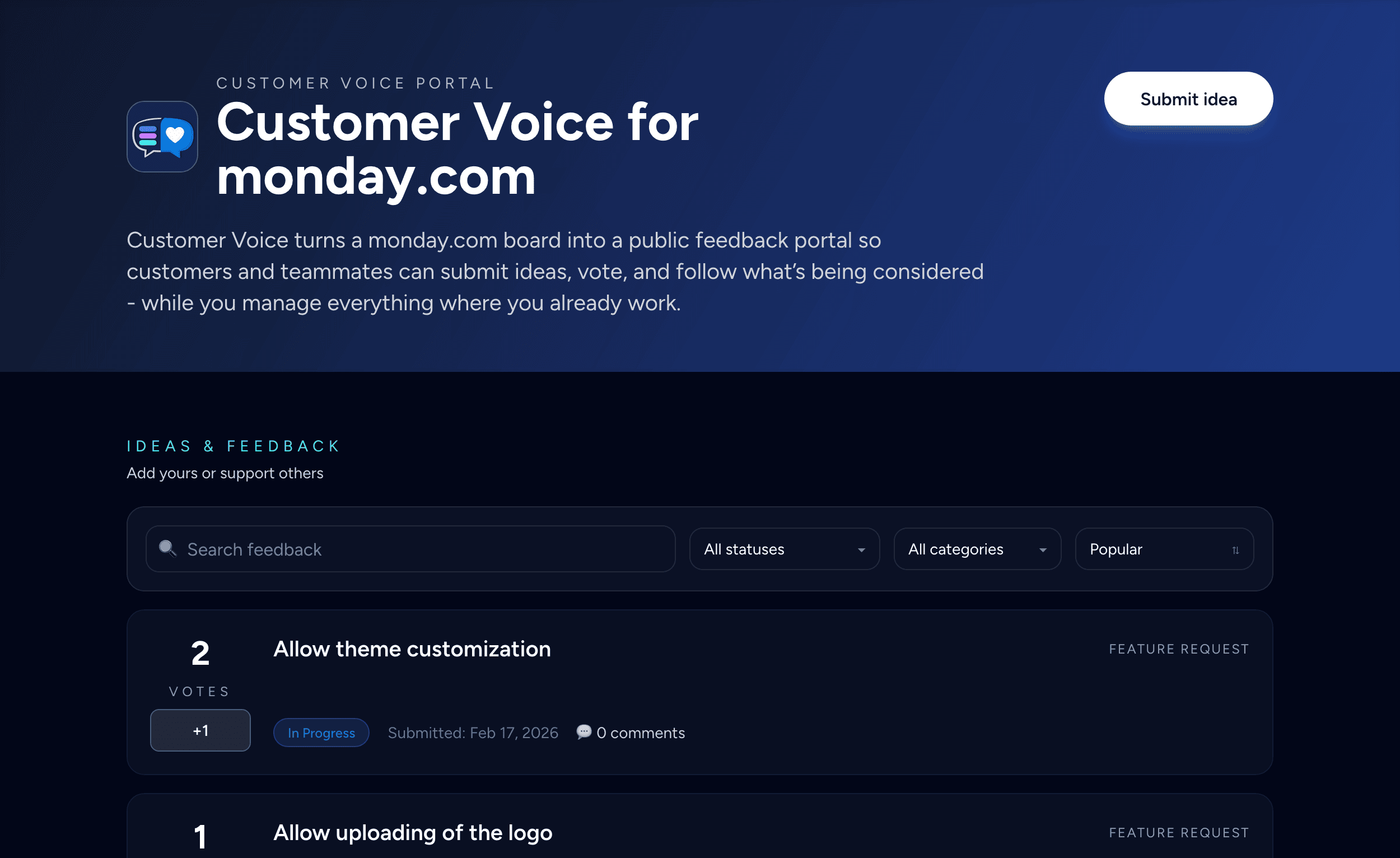
You keep working in monday — but add a structured way to collect, review, and share feedback.
Public feedback portal connected to your board
Users can:
- submit ideas
- browse requests
- interact with feedback
All submissions go directly into your monday board.
Built-in review workflow
Instead of exposing raw feedback immediately:
- new ideas go into an intake group
- reviewed ideas move to a published group
- only published ideas are visible
This creates a clean flow:
collect → review → publish
Voting and prioritization
Customer Voice enables structured prioritization:
- track votes
- categorize requests
- manage statuses
This helps you understand what matters most.
Fully integrated with monday
Everything stays inside your workflow:
- feedback is stored as board items
- updates and comments are part of your process
- notifications can be handled with automations
Customizable and branded
You can:
- add your logo
- customize appearance
- use your own domain (e.g. feedback.yourcompany.com)
Best practices for managing feedback in monday
Keep feedback separate from execution
Don't mix feedback items with tasks.
Review regularly
Set a weekly or bi-weekly process.
Merge duplicates early
Keep your data clean.
Connect feedback to decisions
Link feedback to roadmap items and outcomes.
Conclusion
Collecting customer feedback in monday.com is absolutely possible—but the default approach doesn't scale.
Without structure, you get:
- scattered input
- messy boards
- unclear priorities
With the right system, you get:
- centralized feedback
- clear signals
- better product decisions
Final tip
Even small improvements to how you collect and organize feedback can have a big impact on:
- product direction
- customer satisfaction
- team alignment
If you want to simplify the setup, you can try Customer Voice on the monday marketplace.